
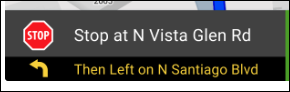
- For drivers using Navigation, added the next turn direction after the current one at the bottom of the map. (This will solve the problem of the MDT not showing where the driver should go until the bus starts moving again; now the direction will be displayed immediately.)
- For customers using the HCTB Cancel-a-Ride feature, added a message on the Bus Guardian Students list to inform the driver when a student won’t be riding the bus: “Student not riding today.” This will appear on both the MDT and K-12 app.
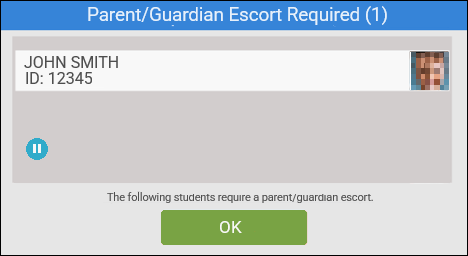
- For students who are entered into the database as requiring a parent or guardian at the bus stop, made the following changes:
Note: Contact your customer success manager (CSM) to enable these for you.- Added a dialog box that will pop up at the stop.
- Added an icon (
 ) that will appear in the title bar and next to the student’s picture in the Students list.
 - Changed the message that is displayed when the student scans on/off the bus from “Walk Permit: NO” to “Parent/Guardian Required: YES.”
- Added a dialog box that will pop up at the stop.
- For customers with no imported waypoints (or poor waypoints), improved how Navigation plans a route, using the shortest path stop to stop according to the side of the street the student will be picked up on.
- For both the MDT and K-12 app, updated the wake-up message to include the region image version and build number.
- Fixed an issue that was producing an Application Not Responding error when Bus Guardian tried to load the photo of a student scanning on the bus.
- Fixed a bug that would crash Bus Guardian if the driver accidentally double-tapped the Send button on the Students screen.
Bus Guardian 2026.01 (02/21/2026)
Modified on: Tue, Jun 30, 2026 at 3:05 PM