
WARNING! If your school district/organization is using our XML API, you’ll need to switch to our JSON API as soon as possible. We will be sunsetting the XML API in March of 2026. You can go to Getting K-12 Data Using the JSON API for details about our JSON API offering. If you have any questions about migrating from XML to JSON, you can email k12apisupport@calamp.com.
CalAmp K-12 (https://login.synovia.com)
- Fixed an issue with the Work in Progress feature that would save the incomplete creation of a new user but wouldn’t load the task when
 was clicked on the Work in Progress screen. (Instead, the Fleet Tracking screen would launch.)
Here Comes the Bus
- On the Scheduled tab of the HCTB Messaging screen, added text to the Warning dialog box that appears when users try to cancel a future HCTB message that explains that messages can’t be canceled within a 10-minute window prior to their scheduled time.
- Added features to the HCTB Accounts screen to show which accounts have been validated:
- Added an Is Validated column that contains a check box. If the box is checked, the account has been validated.
- In the Account Details dialog box, added an Is Validated field with possible values of true and false.
- In the Account Details dialog box, added a Validate Account button that users can click to validate the account.
- Added an Include Not Validated toggle to the top-right toolbar, which, when selected, will show all accounts (both those that have been validated and those that haven’t been). This toggle will be deselected by default.
Student Ridership
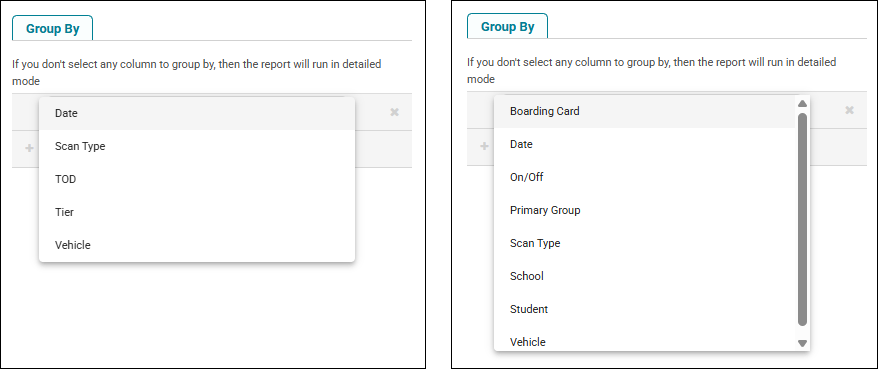
- Added new reports, which are currently in beta, Ridership Details under the Ridership Beta category and Scan History under Scans Beta. These will provide just the Ridership data you need (and all the same information our previous Ridership reports did). The primary difference you’ll see is in the Group By options in the parameters; you use these filters to get specific data. For example, you can select Ridership results grouped by tier and/or vehicle — and Scan History results by boarding card and scan type.
Time and Attendance
- Added a new option to the Overtime report parameters, Show Time as Decimal, which, when deselected, will show the time values in the HH:MM format (such as 12:45) instead of decimal format (such as 12.75). This will default to being selected.
- Added an Hours column to the Exceptions pane of the Shift Exceptions screen, which will show the number of hours (such as 3.75) in the shift.
- For customers using Generic employee assignments, added validation to prevent making assignments for employees if their job code, assignment ID, or start/end date value is empty in the employee import file. Their names will still be recorded in the database, and other assignments will be processed if they have the required data.
- Added a warning to the Schedules tab of TAA System Settings that will inform the user that job schedule definitions must be set below if they select the Update Master Templates with Job Definitions radio button (or its subselection Update Employee Schedules with Nightly Route Imports).
- Fixed an issue with adding/editing shifts that wouldn’t load the GPS data until after the shift was saved.